Property and Infrastructure
Property and Infrastructure provide the following:
Emergencies
For life-threatening events on campus, call:
Ballarat - 1800 333 732 (1800 FED SEC)
Berwick - extension 28555 or call 5122 8555
Gippsland - extension 26662 or call 5122 6662
Wimmera - 000
Dialing the numbers above allows us to enact campus-based safety protocols to direct emergency services to the exact scene of the incident and protect other members of the University Community. You may of course choose to call 000 directly, but remember to advise the Security Team at your campus so internal resources can be sent to assist you and to direct emergency services.
If you are a student at a partner teaching location, contact the emergency number provided to you at your orientation.
Defibrillators
Defibrillators are located at each campus.
Emergency guides (staff only - login required)
For complete guidance on emergencies, refer to the following guides:
- Ballarat emergency guide (pdf, 252kb)
- Berwick emergency guide (pdf, 256kb)
- Gippsland emergency guide (pdf, 255kb)
- Wimmera emergency guide (pdf, 255kb)
Security
Security officers are on campus day and night to help provide a safe and secure environment on all Federation campuses. They are all licensed and qualified in first aid. They provide a broad range of security and safety services, such as conducting patrols, providing security escorts on request, responding to incidents, securing buildings, etc.
Feel free to contact security officers any time on the numbers shown below if you feel unsafe, require an escort, wish to report an incident, or need security advice.
For security assistance (non-emergency situations), call:
Ballarat campuses - extension 6333 or call 5327 6333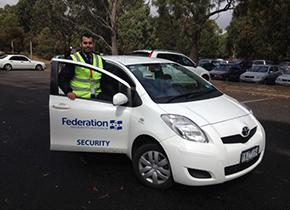
Berwick Campus - extension 28555 or call 5122 8555Gippsland Campus - extension 26662 or call 5122 6662
Wimmera Campus - call 5382 0560 or 0417 820 560
Any company/business who has staff undertaking works on a Federation University campus/work-site, is required to register on our contractor induction system and to have any staff undertaking works complete the applicable contractor induction modules.
To gain access to our contractor induction system (Rapid Global) please email the following information for your company to PropertyInfrastructure@federation.edu.au
- Company name
- Contact person
- Email address
- Phone number
When these details have been entered into our system, you will receive an email providing further information and a link to the Rapid Global portal. This will allow you to complete the registration of your company and obtain induction keys to allow your staff to complete the inductions.
In case of fire
Many buildings are fitted with automated fire/smoke alarms. Whenever an alarm is triggered, Property and Infrastructure and the fire brigade will be automatically notified and a number of trucks dispatched. The fire alarm for the relevant building will sound, followed a short time later by a siren tone and a recorded message instructing people to evacuate the building. All people in the building must evacuate when the instructions are broadcast or when instructed to evacuate by the Campus or Area Warden. In buildings where automatic alarms are not fitted, Area Wardens will issue instructions to evacuate as required. For further information regarding the evacuation of buildings contact the Risk, Health and Safety Manager.
Note on false alarms: The fire brigade always attends once a fire/smoke alarm is triggered and this can be extremely expensive for the University.
Mt Helen Campus - Bushfire Emergency Plan
All staff, students, and visitors to the Mt Helen Campus are encouraged to review the document in advance and follow the instructions as outlined.
If furniture is to be moved e.g. when a staff member is moving office, Property and Infrastructure can assist with the relocation. Your school/section representative should enter an online request via the online works and maintenance management system PULSE, detailing the required move(s) and ensure that it has been endorsed by the appropriate manager of your area. Please ensure that the request is received by Property and Infrastructure at least three working days prior to the required move date and longer for large moves.
Ballarat and Wimmera
Requests for keys or alterations to access cards should be made electronically via the online works and maintenance management system PULSE by your school/section representative. The request will be evaluated and a form will be emailed to the requester which will require signing by the manager of your area. An email will be sent to the requester when the keys are ready for collection. The nominated key holder will then need to bring the appropriate signed form to the Property and Infrastructure office when collecting keys.
It could take up to seven days to issue a key or have a key cut. Please allow up to five days for alterations to access control cards.
Please submit the following Access Request Form (pdf.112kb) to PropertyInfrastructure@federation.edu.au when logging a PULSE request.
Berwick and Gippsland
Requests for keys requires the submission of a Key Issue Approval form (pdf, 316kb). The form should be completed and then signed by an appropriate authorising officer from your School or department. Once completed, the form should be brought to our counter in order to be issued with keys.
Please be aware that, whilst we carry copies of most key codes, there may be occasions where a key will need to be ordered. This would result in a delay of up to one week.
Any loss of University keys should be reported immediately and a Lost Key Notification form (pdf, 284kb) completed and returned to us.
Berwick contact Security office - Room G116, Building 903 or call 03 9904 7444
Camp St contact Student HQ - Building C or call 1800 333 864
Gippsland contact Property and Infrastructure - Room 245, Building 3W or call 03 5122 6512
Horsham contact Student Centre - Building C or call 03 5362 2700
Mt Helen contact Security - 5327 6333
SMB contact Security - 5327 6333
Details
Hours of operation : 8:30 am - 4:30 pm
Contact : 5122 6687 or mailroom.churchill@federation.edu.au
Location : 4N176 Gippsland Campus
Daily mail run
Mailbags are located at one point in each institute/department. All mail and parcels will be delivered and collected once daily from these locations. The morning run commences at approximately 10:30 am with this time varying depending on the volume of mail received. Please ensure your mail bag is checked daily and ready for collection. If you have missed the mail run you can bring mail directly to the mail room by 3:00 pm.
Requests for maintenance may be lodged electronically via the online works and maintenance management system PULSE by your school/section representative. Only registered users of the system may lodge a request and they will act as the contact person for any follow-up communication with Property and Infrastructure. Requests can range from changing a flickering light to altering the temperature of a room.
Link for Western campuses
Link for Eastern campuses
Knowledge Based Articles:
Renovation works are not covered as maintenance. These works can be carried out by Property and Infrastructure provided an approved business case is obtained. Contact Property and Infrastructure for more information or assistance with business case development.
Internal bookings
Timetabling is responsible for allocating available resources for classes and casual bookings at the Federation University Australia campuses - Ballarat, Berwick, Gippsland and Wimmera.
External bookings
Booking enquiries from external clients should be referred to venue and room hire.
Trying to find a campus map, how to get to our campuses, what facilities and services we offer?
Visit our campuses
All general enquiries should be directed to your closest Property and Infrastructure office by calling 5327 9520 and selecting the relevant campus or by emailing PropertyInfrastructure@federation.edu.au
Requests for maintenance should be logged via PULSE.